Migrating and Modernizing SLC 500 and PLC-5: The Complete Guide to Upgrading to CompactLogix and ControlLogix
Files to download
A complete guide to migrating outdated SLC 500 and PLC-5 controllers to CompactLogix and ControlLogix — EOL status, controller mapping, code conversion, network modernization, and 1492 Wiring Conversion tools.
Migrating and Modernizing SLC 500 and PLC-5: The Complete Guide to Upgrading to CompactLogix and ControlLogix
Many industrial plants are facing the need to retire outdated SLC 500 and PLC-5 controllers as manufacturer support comes to an end. This article explains the operational risks of staying on end-of-life hardware, which modern platforms to choose, and walks step by step through the migration process – from code conversion to network modernization and the use of 1492 Wiring Conversion systems.
Why replace outdated SLC 500 and PLC-5 controllers – operational risks and lifecycle status
Rockwell Automation promotes migration away from the SLC 500 and PLC-5 platforms as the official modernization path for industrial control systems. Keeping systems in an end-of-life (EOL) state increases the risk of unplanned downtime, raises maintenance costs, and limits the ability to integrate with modern communication protocols such as EtherNet/IP.
- Lack of firmware updates leaves the system exposed to new security threats.
- Rising maintenance costs stem from limited availability of certified service and spare parts.
- Replacing a single component (e.g., an I/O module) may require rebuilding the entire control cabinet.
Which replacement platforms are recommended for specific SLC 500 and PLC-5 models – mapping legacy to modern controllers
Rockwell offers three main controller families as successors: CompactLogix 5370/5380, ControlLogix 5580, and Micro800. The table below maps individual legacy models to the appropriate modern platforms, highlighting the key migration advantages of each.
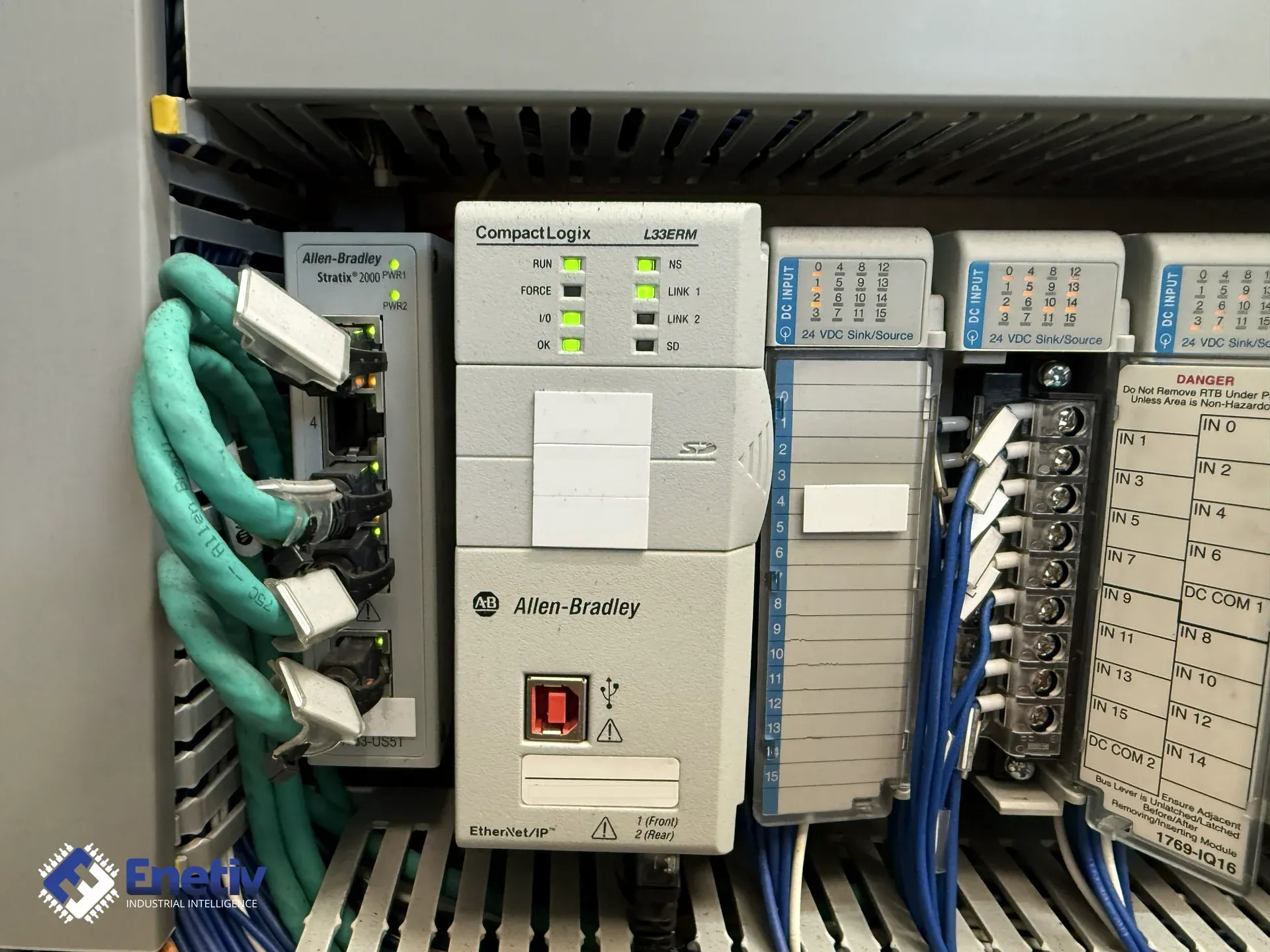
Featured snippet: The recommended mapping of legacy SLC 500 and PLC-5 systems to modern platforms is: 1747-L541 (SLC 5/04) → CompactLogix 1769-L33ERM, 1747-L551/L552 (SLC 5/05) → CompactLogix 5069-L306ER, and larger PLC-5 applications → ControlLogix 1756-L81E, along with increased I/O capacity and EtherNet/IP support.
Table 1. Legacy to Modern Controller Mapping
| Legacy Controller | Recommended Modern Platform | Target Controller Examples | Key Migration Advantage |
|---|---|---|---|
| SLC 500 1747-L541 (SLC 5/04 16K) | CompactLogix 5370 | 1769-L32E, 1769-L33ER / 1769-L33ERM (extended-memory variant, 2 MB) | High I/O compatibility, straightforward software upgrade |
| SLC 500 1747-L551 / L552 (SLC 5/05) | CompactLogix 5380 | 5069-L306ER, 5069-L310ER | Expanded I/O capacity, built-in EtherNet/IP |
| PLC-5 1785 (e.g., 1785-L30, 1785-L40) | ControlLogix 5580 | 1756-L61, 1756-L71, 1756-L72, 1756-L73, 1756-L81E | Modular architecture, support for advanced motion control |
| PLC-5 / SLC 500 – small, standalone applications | Micro800 | 2080-LC20, 2080-L50E | Compact size, low cost, simple programming |
| SLC 500 1747-L552 with faster local network requirements | CompactLogix 5380 | 1769-L24ER | Compact entry-level unit for the 5380 family in smaller applications |
Which migration approach to choose: phased migration or a full rip-and-replace – pros and cons
Rockwell offers two basic scenarios:
- Phased migration – replacing modules one at a time while keeping existing field wiring in place, thanks to the 1492 Wiring Conversion system. Minimizes downtime, but requires careful planning of the replacement sequence.
- Rip-and-replace – completely removing the SLC 500/PLC-5 cabinet and installing a new Logix cabinet. Shortens cutover time, but generates a higher one-time workload and requires full integration testing.
In practice, many companies combine both approaches: first migrating critical lines using 1492 adapters, then moving to a full rip-and-replace once things stabilize.
How to move software from RSLogix 5/500 to Studio 5000 Logix Designer – conversion steps and tools
Rockwell provides automated code conversion tools as part of its migration toolkit. The Project Migrator tool, built into Studio 5000 Logix Designer, translates PLC-5 and SLC 500 programs into the Logix format. The process works as follows:
- Open the project in RSLogix 500 or RSLogix 5.
- Use the Save As function and select the Logix Designer (ACD) format.
- Run Project Migrator, which translates ladder instructions, timers, and counters into the new format.
- Verify the I/O mapping – manually match input/output points to the new CompactLogix/ControlLogix structure.
- Run simulation tests in Studio 5000 Logix Designer before deploying to real hardware.
Keep in mind that automated tools don't cover every custom function – some function blocks may need manual refactoring, and I/O mapping always requires manual verification.
How to modernize the network: migrating DH+, Remote I/O, and DF1 protocols to EtherNet/IP – available gateways and modules
Moving to EtherNet/IP requires bridges and communication modules that translate older protocols into the modern standard. Rockwell notes that its migration solutions include network interface modules that provide this kind of translation. The most commonly used solutions are:
- 1756-DHRIO – an EtherNet/IP communication module with a built-in DH+ adapter, installed in a ControlLogix chassis.
- 1747-AENTR – a gateway module installed in slot 0 of an SLC 500 rack that replaces the SLC processor itself and exposes the existing I/O modules as remote I/O to a ControlLogix system over EtherNet/IP; it is not an add-on card installed alongside a running SLC processor, but a way to keep using an existing I/O rack after the controller has been replaced.
- 1761-NET-ENI / 1761-NET-ENIW – an external serial gateway from DF1/DH-485 to EtherNet/IP, connected to the RS-232 port of an older processor (e.g., SLC 5/03) without replacing the processor – a simpler solution for a transitional period.
- ProSoft Gateways – a family of gateways (e.g., GP-DH-PLUS, GP-DF1) that connect legacy DF1 and Remote I/O networks to EtherNet/IP.
Featured snippet: To migrate from DH+, Remote I/O, and DF1 protocols to EtherNet/IP, use the 1756-DHRIO bridge, the 1747-AENTR rack gateway, the 1761-NET-ENI serial gateway, or ProSoft Gateways (GP-DH-PLUS, GP-DF1) – depending on whether you want to keep the I/O rack after replacing the processor, or simply add Ethernet to an existing controller.
Table 2. Technical Comparison of Target Logix Platforms
| Criterion | Micro800 (2080-L50E) | CompactLogix 5370 (1769-L33ERM) | CompactLogix 5380 (5069-L306ER) | ControlLogix 5580 (1756-L81E) |
|---|---|---|---|---|
| Programming software | Connected Components Workbench (CCW) | Studio 5000 Logix Designer | Studio 5000 Logix Designer | Studio 5000 Logix Designer |
| Maximum I/O capacity | 256 points | 2,000 points | 4,000 points | 8,000 points |
| Number of EtherNet/IP nodes | Up to 10 | Up to 32 | Up to 64 | Up to 128 |
| Integrated motion axes | No | Yes (up to 4) | Yes (up to 8) | Yes (up to 16) |
| Hot-swap support | No | Yes | Yes | Yes |
Which hardware tools speed up migration – 1492 Wiring Conversion systems and accessories
Rockwell offers migration solutions that include controller and I/O wiring conversion systems. The 1492 Wiring I/O System family makes it possible to transfer existing field wiring from older SLC 500/PLC-5 cabinets to new ControlLogix or CompactLogix chassis without having to manually re-terminate every wire.
Key components of the 1492 Wiring Conversion system:
- 1492-CABLE – a special cable with built-in pins matched to both systems.
- 1492-IFM – an interface module that adapts legacy terminals to the new sockets.
- 1492-CH1746-4 – a ready-made 4-slot chassis enabling quick connection of the I/O conversion.
Featured snippet: The 1492 Wiring Conversion system (1492-CABLE, 1492-IFM, 1492-CH1746-4) allows existing wiring to be transferred from SLC 500/PLC-5 cabinets to new CompactLogix/ControlLogix controllers without disconnecting field terminals, reducing the risk of errors and cutting downtime by as much as 90 percent.
Table 3. Legacy vs. Modern Communication Protocol Migration
| Legacy Protocol | Modern Equivalent Protocol | Recommended Migration Hardware / Interface | Network Architecture Impact |
|---|---|---|---|
| DH+ (Data Highway Plus) | EtherNet/IP | 1756-DHRIO | Simplified topology – a single Ethernet network |
| Remote I/O (RIO) | EtherNet/IP | ProSoft GP-DH-PLUS, 1492-IFM | Eliminates dedicated RIO segments |
| DF1 (RS-232) | EtherNet/IP | ProSoft GP-DF1, 1761-NET-ENI | Consolidates serial communication onto Ethernet |
Table 4. Hardware Migration Kits and Accessories
| Migration Kit Family | Legacy I/O System | Target I/O System | Primary Benefit & Downtime Reduction Impact |
|---|---|---|---|
| 1492 Wiring Conversion | 1746 I/O (SLC 500) | 1756 I/O (ControlLogix) or 5069 I/O (CompactLogix) | Zero-touch rewiring – up to 90% reduction in downtime |
| 1492 IFM/CABLE Kit | 1771 I/O (PLC-5) | 1756-series I/O modules (e.g., 1756-IB16, 1756-OB16, 1756-IF8 – selected by signal type) in ControlLogix | Modular replacement, existing wiring preserved |
| 1492-CH1746-4 Chassis Kit | Legacy 4-slot chassis | New 4-slot ControlLogix chassis | Direct cabinet replacement, minimal installation effort |
| ProSoft Gateway Kit | DF1 / Remote I/O | EtherNet/IP | Enables gradual network migration without interrupting production |
Where to find support and spare parts – Enetiv's offering
Enetiv is a supplier and broker of industrial automation components – new, used, and refurbished – including the brands Allen-Bradley (Rockwell Automation), Siemens, Schneider Electric, Bosch (including Bosch Rexroth/Indramat), and ABB, as well as other brands available on the secondary market. The range includes PLC controllers, inverters, HMI panels, and external devices, sold B2B. Get in touch: https://enetiv.com/kontakt.
FAQ
How do I check whether my SLC 500 controller is already in the EOL phase?
The easiest way is to check the product's status in the "Product Lifecycle" section on the Rockwell Automation website. If a model no longer has firmware updates or technical support available, it means it has reached its end-of-life (EOL) phase.
Can I migrate RSLogix 500 code without manual editing?
Automated conversion is possible using Project Migrator in Studio 5000 Logix Designer, but after migration you should always manually verify the I/O mapping and control logic, since not all custom blocks are translated automatically.
What are the main benefits of using the 1492 Wiring Conversion system?
The 1492 system lets you keep your existing field wiring in place, eliminating the risk of errors from re-terminating wires and cutting downtime by as much as 90 percent compared to a traditional wiring replacement.
Is it possible to move to EtherNet/IP partially, while keeping some legacy protocols in place?
Yes. With ProSoft gateways (e.g., GP-DH-PLUS, GP-DF1) you can keep selected DH+ or DF1 segments running, gradually switching further sections of the network to EtherNet/IP without interrupting production across the entire installation at once – letting you spread the cost and risk of network migration across several stages instead of one complex, one-time replacement.