Used Siemens S7-300 modules from dismantled cabinets: what to check before buying a CPU, SM331, SM322 and IM361
Files to download
The machine is down and the new part is weeks away? A pre-purchase checklist for used S7-300 modules from dismantled cabinets: CPU, SM331, SM322 and IM361, the series’ market status and replacement steps.
Used Siemens S7-300 modules from dismantled cabinets: what to check before buying a CPU, SM331, SM322 and IM361
The machine is down, there is no spare card in the cabinet, and the delivery date for a new part is far off or uncertain. In such a situation, used modules from dismantled equipment are sometimes the only reasonable option. A module from a cabinet that is being taken apart may be fully working or may have hidden damage, and you often cannot tell the difference by looking at it. That is why it is worth going through a fixed checklist before buying.
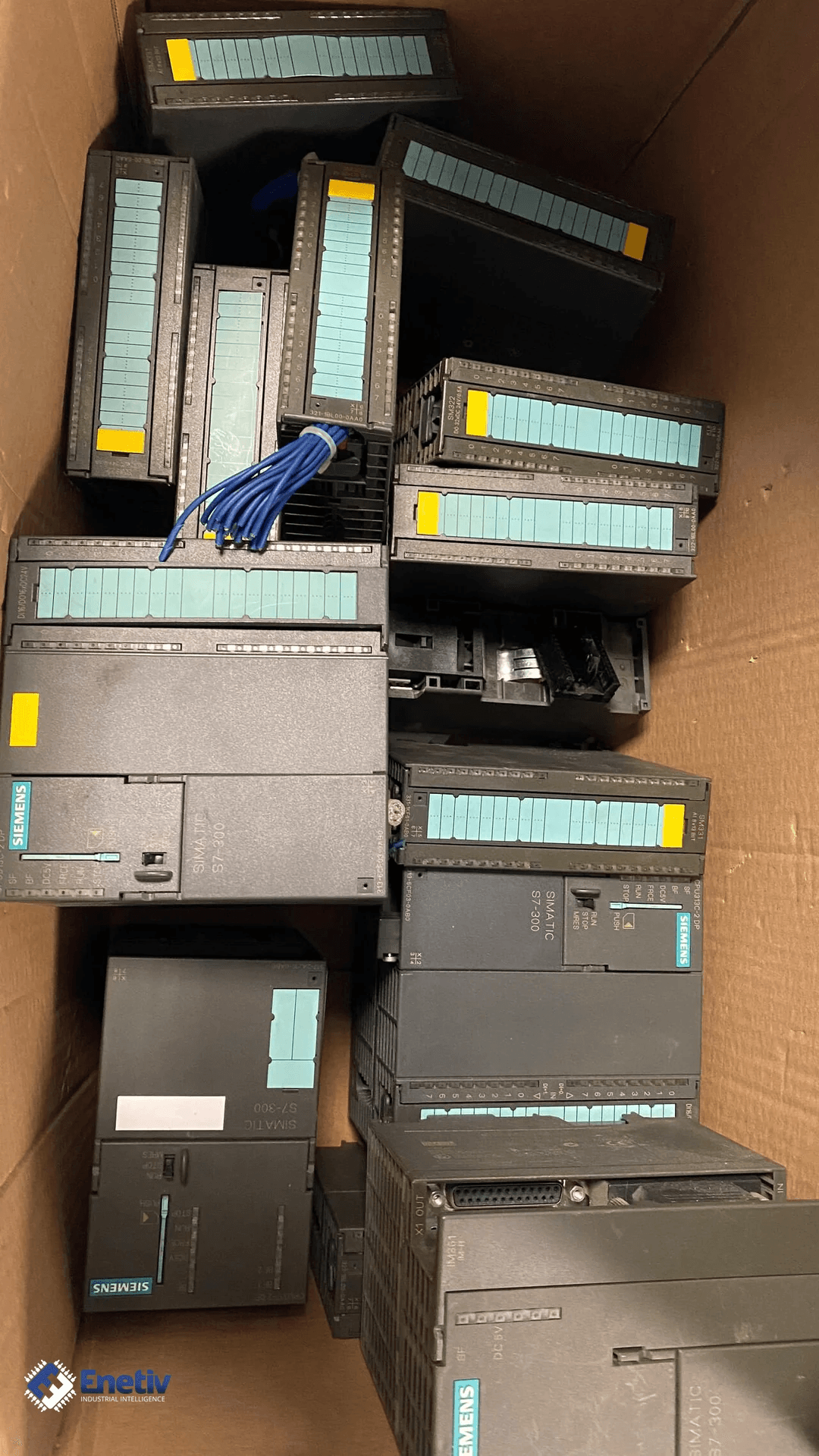
The S7-300 is a modular PLC mounted on a rail. The power supply, central processing unit (CPU), input and output modules and interface modules sit next to each other and are connected by a bus. These controllers have been running in machines and production lines for years, so failures still happen, and parts have to be sought outside the distribution channel as well. This article covers four module types: CPU, SM331, SM322 and IM361. It also shows what the available sources say about their market status.
Market status of the S7-300: what the sources say
Before buying a used module, it is worth knowing how availability of new parts looks. In this respect the sources are not consistent. Users of the circuitsonline forum report that Siemens practically no longer supplies the 300 series and that it is obsolete, and that in some places only spare parts are available. Another user writes that almost all 300 modules have been in the "phase out" stage since 10 January 2023, but remain an active product until stocks run out. According to him, a 10-year exchange phase then begins, meaning you return the old part and receive a repaired one.
Another source indicates that the manufacturer is also phasing out the SIPLUS variants of these modules. The list on the Eichler Service website covers CPUs from 312 to 319, the SM321, SM322, SM331 and SM332 modules, CP, FM, and IM360, IM361 and IM365. Eichler Service lists these modules as being discontinued from 01.10.2025. Both sources indicate that the availability of new parts is limited. Confirm the current status of a specific order number in the manufacturer's documentation.
The same forum thread also mentions an alternative. Users report that Vipa controllers (now Yaskawa, according to them) remain on sale, that they can be mixed with Siemens 300 series modules, and that Vipa modules do not require an MMC card. Another user writes that older cards "are lying in warehouses and in racks from the cabinets that were replaced". These are user accounts, not manufacturer data. Do not treat them as a guarantee of compatibility for specific units.
The role of the individual modules
A good check starts with what the given module does in the system. Below is a short overview of the four types.
CPU
The CPU executes the user program and manages data and communication. The Eichler list includes CPUs from 312 to 319, and their entries differ in variant (e.g. compact "C" CPUs, DP, PN/DP, F and T versions) and in the stated capacity. When buying a used CPU, check the exact type, because the new type must be able to run the program from the old one. According to forum users, replacing a CPU 317 with a 313 is usually troublesome.
SM331
The SM331 is an analog input module, that is, it measures signals such as voltage, current, resistance or temperature. The list includes variants with different numbers of channels and different resolutions, as well as versions for thermocouples, PT100 and HART. The manufacturer states that the supported thermocouples depend on the module (B, C, E, J, K, L, N, R, S, T, U and TXK/XK(L) GOST). This is one of the reasons why the designation "SM331" alone is not enough to place an order.
SM322
The SM322 is a digital output module that drives coils, valves and other two-state loads. The variants differ in the number of channels, the output type (transistor DC 24 V, AC 120/230 V, relay) and the current per channel. A used module with the wrong output type or too low a current may fit mechanically, but it will not work correctly in the application.
IM361
The IM361 is an interface module used in an expansion station. It serves it together with the IM360 in the central station, and in the list it is described as a module with the K-Bus. In the same list, the IM365 is shown as a module without the K-Bus. Therefore, do not assume that the IM361 and IM365 are interchangeable. The IM360/361 connecting cables are available in lengths of 1 m, 2.5 m, 5 m and 10 m. Check which cable connects the stations in your machine.
Example variants from the list
The tables below contain example entries from the Eichler Service list. The descriptions from the list were translated into English, and the order numbers and values were left unchanged. The entries illustrate how much the variants of a single module type differ.
| Order number | Description in the list (CPU) |
|---|---|
| 6ES7312-1AE14-0AB0 | CPU312, 32KB |
| 6ES7314-1AG14-0AB0 | CPU314, 128 KB |
| 6ES7315-2AH14-0AB0 | CPU315-2DP, 256 KB |
| 6ES7317-2EK14-0AB0 | CPU317-2 PN/DP, 1 MB |
| 6ES7318-3EL01-0AB0 | CPU319-3 PN/DP, 2 MB |
| Order number | Description in the list (SM331) |
|---|---|
| 6ES7331-1KF02-0AB0 | SM331, 8 analog inputs, 13bit |
| 6ES7331-7KB02-0AB0 | SM331, 2 analog inputs, 9/12/14Bit |
| 6ES7331-7KF02-0AB0 | SM331, 8 analog inputs, 9/12/14Bit |
| 6ES7331-7PF01-0AB0 | SM331, 8 analog inputs, resistance, PT100/200/1000 |
| 6ES7331-7PF11-0AB0 | SM331, 8 analog inputs, 16bit, thermocouples |
| 6ES7331-7TF01-0AB0 | SM331, 8 analog inputs, 0/4-20MA HART |
| Order number | Description in the list (SM322) |
|---|---|
| 6ES7322-1BF01-0AA0 | SM322, 8 digital outputs, DC24V, 2A |
| 6ES7322-1BH01-0AA0 | SM322, 16 digital outputs DC24V, 0.5A |
| 6ES7322-1BL00-0AA0 | SM322, 32 digital outputs DC24V, 0.5A |
| 6ES7322-1FF01-0AA0 | SM322, 8 digital outputs, AC120/230V, 1A |
| 6ES7322-1HH01-0AA0 | SM322, 16 digital relay outputs |
| 6ES7322-5HF00-0AB0 | SM322, 8 digital relay outputs, DC24V, AC120-230V, 5A |
What to watch for when buying and replacing
The list below organizes the checks worth doing before you pay for a used module. Each point addresses a different kind of risk: physical damage, a mistake in the designation, or a part of uncertain origin.
- Visual inspection of the housing. Look for cracks, discoloration from overheating, and signs of moisture and corrosion. A darkened or deformed housing indicates operation in poor conditions.
- Front connectors and bus contacts. Check for bent or dirty contacts and damaged sockets. In the list, front connectors come in, among others, 20-pin and 40-pin versions, with screws or spring-clip terminals, so make sure you get the right ones. A used module often reaches you without them, so also check that you have connectors that fit the variant.
- LEDs after power-up. After applying power, pay attention to the LEDs signaling an error or lack of communication. An LED that stays off, or a permanent error, is a sign that the module is not worth taking without an explanation.
- Stickers with hardware revision and firmware. Write down the markings from the housing and compare them with the module in the project. Differences in version may decide whether the module fits the configuration.
- Full order number. Read it in full and compare it with the module installed in the machine. The list shows that variants differ in the end of the number, e.g. 6ES7331-7PF01-0AB0 (8 analog inputs, PT100) and 6ES7331-7PF11-0AB0 (8 analog inputs, thermocouples). A mistake in one character changes the signal type.
- Match with the hardware configuration. Check that the module corresponds to what is set in the project. Differences in module type will only become visible after start-up.
- Measuring range modules (SM331). The list contains the item "measuring range modules for analog inputs, 2 pcs." (in the original "Messbereichsmod.E f. Analogeing., 2St."; this is the wording in the original list). When buying an SM331, check that they are installed and that the setting matches the signal in the project.
- Test on a test bench. Build a setup with a power supply and a CPU, and then check the module under a load close to the real one. The mounting order in the example Siemens instructions is, from the left: PS307 power supply, CPU, SM331 module.
- Origin of the part. Ask what machine or cabinet the module comes from and whether it was removed after a failure. A record in the purchase documentation makes later root-cause investigation easier.
- What "tested" means. Ask how the seller tested the module, on what test setup and with what result. The word alone, without a description of the test, guarantees nothing.
If the seller cannot answer these questions, treat the offer with caution and decide whether the risk is acceptable for the given machine.
The differences below come from the available sources. Each of them has practical consequences when selecting a spare part.
- CPU, different types. Forum users write that a CPU can be replaced with a different type as long as the new one runs the program, and that replacing a 317 with a 313 is usually difficult. Before buying, compare the program's requirements with the capabilities of the CPU, and do not choose a smaller type without checking.
- Memory cards. The list includes S7 Micro Memory Cards with capacities from 64 KB to 8 MB. The sources do not say which cards fit which CPUs, so do not assume interchangeability and check the CPU documentation.
- Vipa instead of Siemens. Forum users report that Vipa modules do not require an MMC card and that their MPI port has built-in RS232. In addition, there is a report that later models have Ethernet. These are forum opinions, so verify them for the specific model.
- Moving to the S7-1500. According to forum users, it is a different platform and some instructions differ. An older project may need corrections, so plan time to review them.
- SM331, resolution and input types. The variants differ in the number of channels, resolution (13 bit, 9/12/14 bit, 16 bit) and intended use (voltage/current, PT100, thermocouples, HART). Order only the variant that matches the number in the project.
- SM331 for thermocouples. The Siemens manual lists the SM331 AI 8 x TC (for thermocouples only) with the number 6ES7331-7PF10-0AB0. The supported thermocouple types depend on the module, so check them in the module data manual.
- SM322, output type. The list distinguishes DC 24 V, AC 120/230 V and relay outputs, as well as different currents (e.g. 0.5 A, 2 A, 5 A). Match the output type and current to the loads that the module supplies.
- IM361 and IM365. The IM361 is described as a module with the K-Bus, and the IM365 as a module without the K-Bus. Check which of them is installed, and do not swap them without confirmation in the documentation.
General replacement steps
After the purchase, an orderly procedure still applies. It helps avoid a situation in which a faulty module stops the machine right away.
- Make a backup of the controller program and configuration.
- Establish which modules are installed and write down their full designations.
- Select a part that matches these designations, including front connectors and any measuring range modules.
- Switch off the power. Siemens warns in its instructions that there is a risk of electric shock once the PS307 power supply is switched on, so always disconnect the power before wiring.
- Remove the old module, install the new one and connect the wiring according to the labeling on the connector.
- Start the controller and check the LEDs and diagnostics.
- Test the inputs, outputs and communication. With thermocouple inputs, incorrect wiring or open inputs can produce an underflow signal and the value 8000H (an example for type U from the module data manual).
- Record the changes in the machine documentation, including the serial number and origin of the installed module.
Practical summary
First, establish the exact order number of the module you are replacing and compare it character by character with the offer. Then order together with the module everything that is not part of it, that is, front connectors, measuring range modules (SM331) and any cables for the IM360/361. Plan a test bench with a power supply and a CPU, and ask the seller for a description of the test. Remember that the information on availability and the status of the series comes partly from a forum, so confirm the current state in the manufacturer's documentation.
Enetiv is a company from Żywiec, Poland, trading in industrial automation parts: PLC controllers, inverters, HMI panels and external devices. We offer new, used and refurbished parts from brands including Allen-Bradley (Rockwell Automation), Siemens, Schneider Electric, Bosch Rexroth and ABB, as well as other manufacturers available on the secondary market, at competitive prices and with discounts on top-brand products. We also specialize in end-of-life (EOL) parts and service, including older-generation and unusual components. If needed, we also help arrange an automation technician on site. Write to us via enetiv.com/kontakt and we will help you find a part or a replacement.