Renishaw RMI-Q: Diagnostic LEDs and No Communication with an RMP60, RMP40 or RLP40 Probe - How to Check It
Files to download
The measuring cycle stops mid-program, the control gets no signal from the probe, and the operator cannot tell whether the battery, the probe setup or the interface is at fault. Learn what the Renishaw RMI-Q LEDs show and in what order to look for the cause of lost communication with an RMP60, RMP40 or RLP40 probe.
Renishaw RMI-Q: diagnostic LEDs and no communication with an RMP60, RMP40 or RLP40 probe - how to check it
The measuring cycle stops halfway through the program, the control receives no signal from the probe, and the operator does not know whether the battery, the probe position or the interface itself is at fault. A radio touch probe on a CNC machine tool measures the workpiece or the tool, and the receiver with its interface passes the probe signals to the control. When this link drops, the machine can perform neither job set-up nor part inspection, so the downtime lasts until the cause is found.
The RMI-Q interface shows its status on LEDs, so it is best to start the diagnosis by reading them, and only then deal with the probe or the cable. The sections below cover which probes work with the RMI-Q, which LEDs the interface has, what its power requirements are, and how to organize the check when an RMP60, RMP40 or RLP40 probe stops communicating.
Supported probes
First compare the lack of communication with the list of probes the interface supports. The RMP40, RMP40M, RMP400, RMP60, RMP60M and RMP600 are intended for workpiece measurement, and the RLP40 and RLP40H for inspection on lathes. The RMP40 is a radio spindle probe for automatic workpiece inspection and job set-up on multi-tasking machines and machining centers, while the RLP40 is a compact probe with a diameter of 40 mm for job set-up and inspection. With radio M-code start, the RMI-Q supports up to 4 probes, which matters on machines with several probes or a tool probe, because each of them must be correctly paired with the interface. With spindle-rotation start or shank switch start, the number of probes is not limited.
Interface power supply
Insufficient power gives symptoms similar to a loss of radio communication, so check the voltage first. The RMI-Q requires 12-30 V DC and can take its power from the machine tool installation; the power supply and wiring should withstand a peak current draw of up to 500 mA at switch-on.
RMI-Q diagnostic LEDs
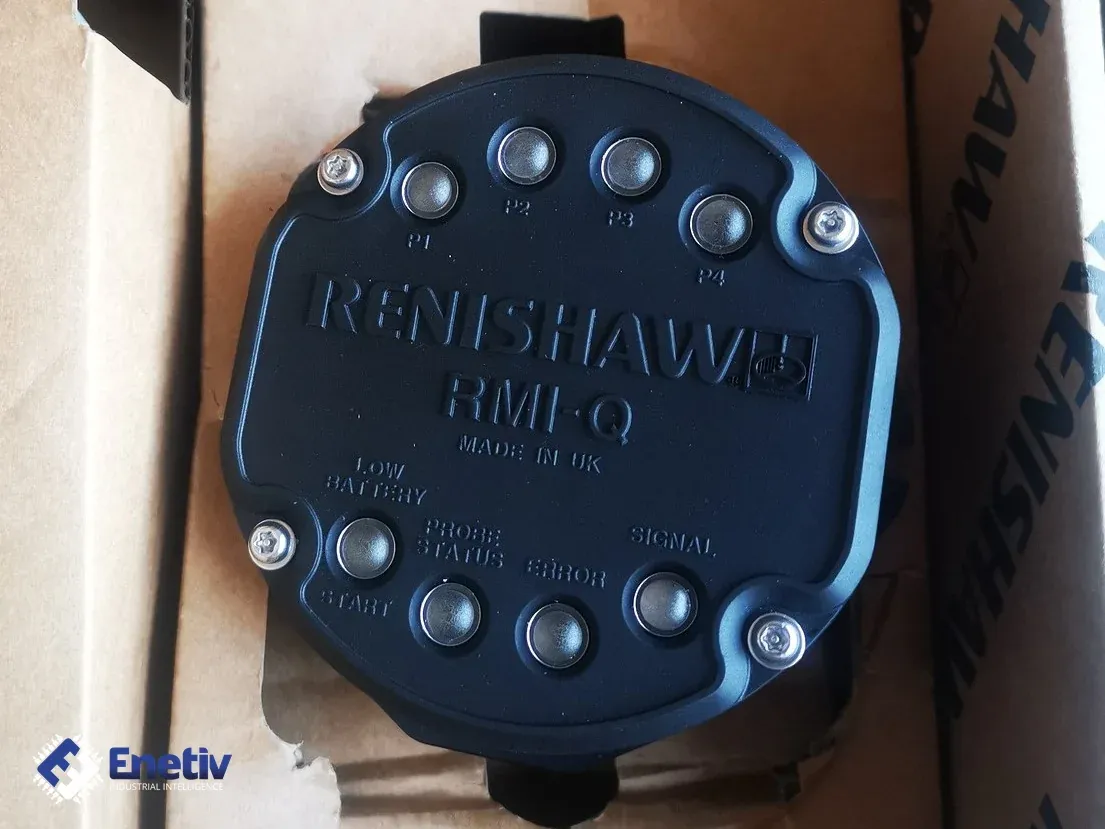
The LEDs are the first source of information on whether the interface and the probe can see each other. The manufacturer lists the Start, Low Battery, Probe Status, Error and Signal LEDs and the system status LEDs P1, P2, P3 and P4. The meaning of the colors and blinking is given in the visual diagnostics table in the RMI-Q manual, so the LED state must be read from that table, not guessed. It is also worth noting which LEDs were lit at the moment of the failure, because this makes the conversation with service easier.
Connecting the RMP60 probe
For connecting up to 4 RMP60 probes, the manufacturer refers to the RMI-Q installation guide. If multi-probe mode was not selected in the probe settings, deflecting the stylus for longer than 4 seconds returns the probe to the start method selection. After multi-probe mode is selected, go to the search mode to connect one probe to the RMI-Q. A wrong mode selection can therefore look like a loss of communication even though the probe and the interface are working.
What to watch for when testing
The test result can be distorted by factors that have little to do with the probe itself. The RMI-Q operating range is up to 15 m, and the manufacturer gives a range envelope for each probe, so a probe at the edge of the zone may connect intermittently. Among the causes of a mismatch between the RMP60 probe LEDs and the RMI-Q LEDs, the manufacturer lists loss of communication when the probe is out of range and obstruction or shielding by metal, and in that case it recommends reviewing the installation. For the same reason, the manufacturer does not recommend mounting the RMI outside the machine tool.
The second area is electrical interference: the interface should be installed away from transformers and servo drives, and the cable should be routed away from sources of high current, e.g. motor supply cables, and kept as short as possible. The third is the RMP60 probe batteries, because after the first low battery warning about a week of operation remains. It is also worth inspecting the connectors and the cable and checking the labels, because the RMI-Q comes with an 8 m cable (A-5687-0049) and a 15 m cable (A-5687-0050), and also in the RMI-QE version.
How the check goes
Working from the simplest to the most time-consuming causes shortens the fault finding. First check the power supply and the interface LEDs, then assess the batteries in the probe and its position relative to the RMI-Q: the distance, any metal covers, and the direction the signal comes from. Then compare the probe LEDs with the RMI-Q LEDs using the table in the manual, and finally run a measuring test.
After a collision or when stylus deformation is suspected, the manufacturer indicates recalibrating the probe. This also matters when communication has returned but the measurement results are in doubt. Record the results of the following steps, the LED states and any changes to the installation, because if the fault recurs they let you narrow down the cause quickly.
Enetiv works in industrial automation from two sides: we supply parts and we repair them. We carry PLC controllers, inverters, HMI panels and external devices as new, used and refurbished, including brands such as Allen-Bradley (Rockwell Automation), Siemens, Schneider Electric, Bosch Rexroth and ABB. We also specialize in end-of-life (EOL) parts and service, including older-generation and unusual components. We diagnose and repair inverters, servo drives, I/O modules and controllers, and we also service motors and servomotors. Contact us at enetiv.com/kontakt.