Siemens SCALANCE XB005 (6GK5005-0BA00-1AB2) – used industrial Ethernet switch: how to read the label data, 24 V DC or 24 V AC supply and what to check before commissioning
Files to download
An unmanaged switch links the controller, panels and drives in small cabinet networks, and a fault or wrong supply cuts off the whole group of devices. What to check in a used SCALANCE XB005: the label, 24 V AC/DC supply and commissioning. seo.metaTitle: Used Siemens SCALANCE XB005: Label Data and 24 V Power Supply
Siemens SCALANCE XB005 (6GK5005-0BA00-1AB2) – used industrial Ethernet switch: how to read the label data, 24 V DC or 24 V AC supply and what to check before commissioning
An unmanaged switch is a simple element of an industrial network that connects the controller, operator panels, drives and other devices to Ethernet in small star or line topologies in a control cabinet, and you are looking for a unit that is to play exactly that role. It needs no configuration, so a failure or an incorrect power supply immediately cuts the whole group of devices off from the network. With a used unit, it is all the more important to be certain what exactly goes into the cabinet.
Brief description of the XB005
SCALANCE XB005 is an unmanaged switch, meaning it works without configuration and without management functions, and its purpose is to build small star and line topologies.
| Parameter | Value | Practical meaning |
|---|---|---|
| RJ45 ports | 5 ports 10/100 Mbit/s (twisted pair) | Five devices or links can be connected, and 10/100 Mbit/s support means it also works with older devices. |
| Power supply | 24 V AC/DC, range from 19.2 to 28.8 V | The voltage of the power supply or transformer under load must fall within this range. |
| Power connection | 3-pole terminal block | Before connecting the wires, the markings next to the terminals on the housing must be read. |
| Maximum current consumption | 0.07 A | The value is used to select the load capacity of the power supply and the circuit protection. |
| Power loss | 1.68 W | This is heat released in the cabinet, significant when devices are packed densely. |
| Power input protection | 0.6 A / 60 V | This is internal protection of the power input and does not replace the circuit protection in the cabinet. |
| Operating temperature | -10 ... +60 °C | The value should be compared with the temperature inside the cabinet, not with the temperature of the plant hall. |
| Mounting | 35 mm rail | Check that the latch holds on the rail and is not damaged. |
| Product status | PM300, active product | Information from the Siemens Mall product page; it should not be used to infer interchangeability with other switches. |
What to watch out for when replacing
When replacing, you first compare what follows from the catalogue data with what is actually visible on the unit, and only then move on to connecting.
Catalogue data
- 24 V AC/DC supply and voltage range: the supply should be recorded and checked as 24 V AC/DC in the range from 19.2 to 28.8 V, so a power supply with a voltage outside this range is out of the question.
- Three-pole terminal block: power is fed to the terminal block, so the wires and ferrules must fit it, and the terminal markings must be read from the housing.
- Current consumption and input protection: the maximum consumption is 0.07 A, and the power input protection is 0.6 A / 60 V, which makes it possible to assess whether the existing supply circuit is sufficient.
- Operating temperature: from -10 to +60 °C, so in a cabinet with other heat sources it has to be related to the temperature inside the cabinet.
- Rail mounting: the 35 mm rail requires checking the latch, so that the switch does not slide off when the wires are moved.
Label and housing
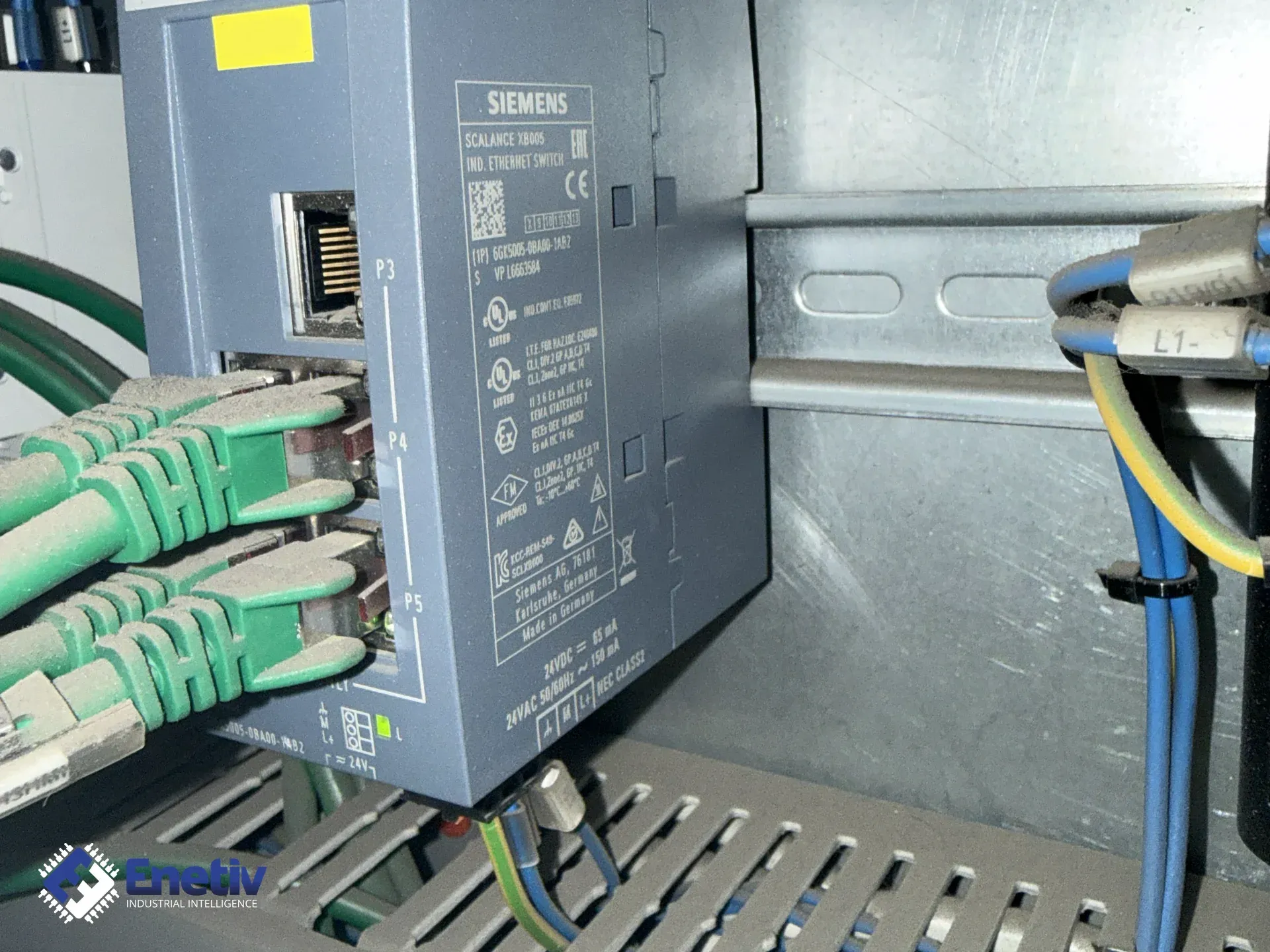
- Designation and catalogue number: the label bears the text “SCALANCE XB005 IND. ETHERNET SWITCH” and the catalogue number 6GK5005-0BA00-1AB2 preceded by the code (1P), which makes it possible to unambiguously confirm that the unit is exactly this model.
- Power supply data from the label: it states 24VDC 65 mA and 24VAC 50/60Hz 150 mA, so the label indicates both DC and AC supply; these values should be noted separately, exactly as they were read.
- Markings on the housing: ports P3, P4, P5, terminals L+ and M and the L LED are visible, and before connecting they must be read and compared with the installation documentation.
Practical check
- Inspection of the housing and RJ45 ports: the contacts, broken-off latches and signs of overheating are assessed, because a damaged socket gives intermittent communication that is hard to diagnose later.
- Serial number and designation: the serial number should be read, and the designation compared with the catalogue number, so that it matches what was ordered.
- Hardware version: if it is visible on the housing, it is worth recording together with the other data of the unit.
- Terminals: check that they are not damaged or dirty, because a poor contact in the power supply shows up as random restarts.
- Voltage measurement: before connecting, the supply voltage is measured with a multimeter and compared with the range from 19.2 to 28.8 V.
- Documentation: the origin of the unit should be documented, so that during later service it is known where the device comes from.
Commissioning
Commissioning a used switch comes down to a few steps carried out in sequence, and the order matters, because it makes it possible to catch a problem at the earliest possible stage, before it affects the rest of the network.
- Disconnecting the power in the circuit from which the switch will be supplied.
- Mounting the switch on the 35 mm rail and checking that the latch holds.
- Connecting the power wires to the three-pole terminal block, after reading the markings next to the terminals on the housing.
- Measuring the supply voltage and confirming that it falls within the range from 19.2 to 28.8 V.
- Switching on the power and observing the LEDs, which are used to assess the operation of the device and the state of the ports.
- Connecting the remaining ports one by one, one device at a time, so that any problem can be attributed to a specific link.
- Checking communication with the devices in the network, for example whether the controller sees the operator panel or the drive.
Before making an enquiry or a purchase, it is worth preparing a complete set of data: the full designation from the label, the serial number, photos of the label and connectors, a description of the application and the power supply parameters in the cabinet. With such a set it is easy to confirm that the unit matches what is needed in the installation, and to leave a clear trail for subsequent service work.
Questions and answers
Does the XB005 require configuration?
No, the XB005 is an unmanaged switch and has no management functions, so after mounting and connecting the power it starts working without any settings.
What should be checked before first switching on a used unit?
First of all, inspection of the housing, ports and terminals, reading the label together with the catalogue number and the serial number, and finally measuring the supply voltage with a multimeter before connecting.
Enetiv works in industrial automation from two sides: we supply parts and we repair them. We have new, used and refurbished parts from brands including Allen-Bradley (Rockwell Automation), Siemens, Schneider Electric, Bosch Rexroth and ABB, we diagnose and repair inverters, servo drives, I/O modules and controllers, we service motors and servomotors, with our own warranty on repairs. We also specialize in end-of-life (EOL) parts and service, including older-generation and unusual components. Please contact us at https://enetiv.com/zapytanie.
Sources
- Siemens — SCALANCE XB005 (6GK5005-0BA00-1AB2) – Siemens Industry Mall product page (English version)
- Siemens — SCALANCE XB005 (6GK5005-0BA00-1AB2) – data sheet, edition 29.07.2018 (English version)
Publication date: 24.11.2026