Used KAESER CSD 122 T compressor with SIGMA CONTROL controller – what to check when assessing the machine's condition
Files to download
A screw compressor does not run on its own: a controller supervises it and stores its operating and service history. How to assess a used KAESER CSD 122 T: identifying the SIGMA CONTROL generation, inspection and the data you need before buying.
Used KAESER CSD 122 T compressor with SIGMA CONTROL controller – what to check when assessing the machine's condition
An oil-flooded screw compressor supplies the compressed air network in a plant and does not work alone: it is supervised by a controller, and on the machine side it is accompanied by the air installation and the electrical supply. Anyone considering buying a used KAESER CSD 122 T compressor should be able to assess what they are actually buying together with the machine. Assessing the controller and its history is just as important here as assessing the mechanics, because it is the controller that stores the knowledge of how the machine was operated and serviced.
In practice this means that before talking about the price or the pickup date, it is good to see the machine both cold and in operation, and to review what is recorded in its memory. A compressor may look tidy and still have years of work in harsh conditions behind it, the traces of which have been preserved precisely in the message history and the counters.
SIGMA CONTROL controller
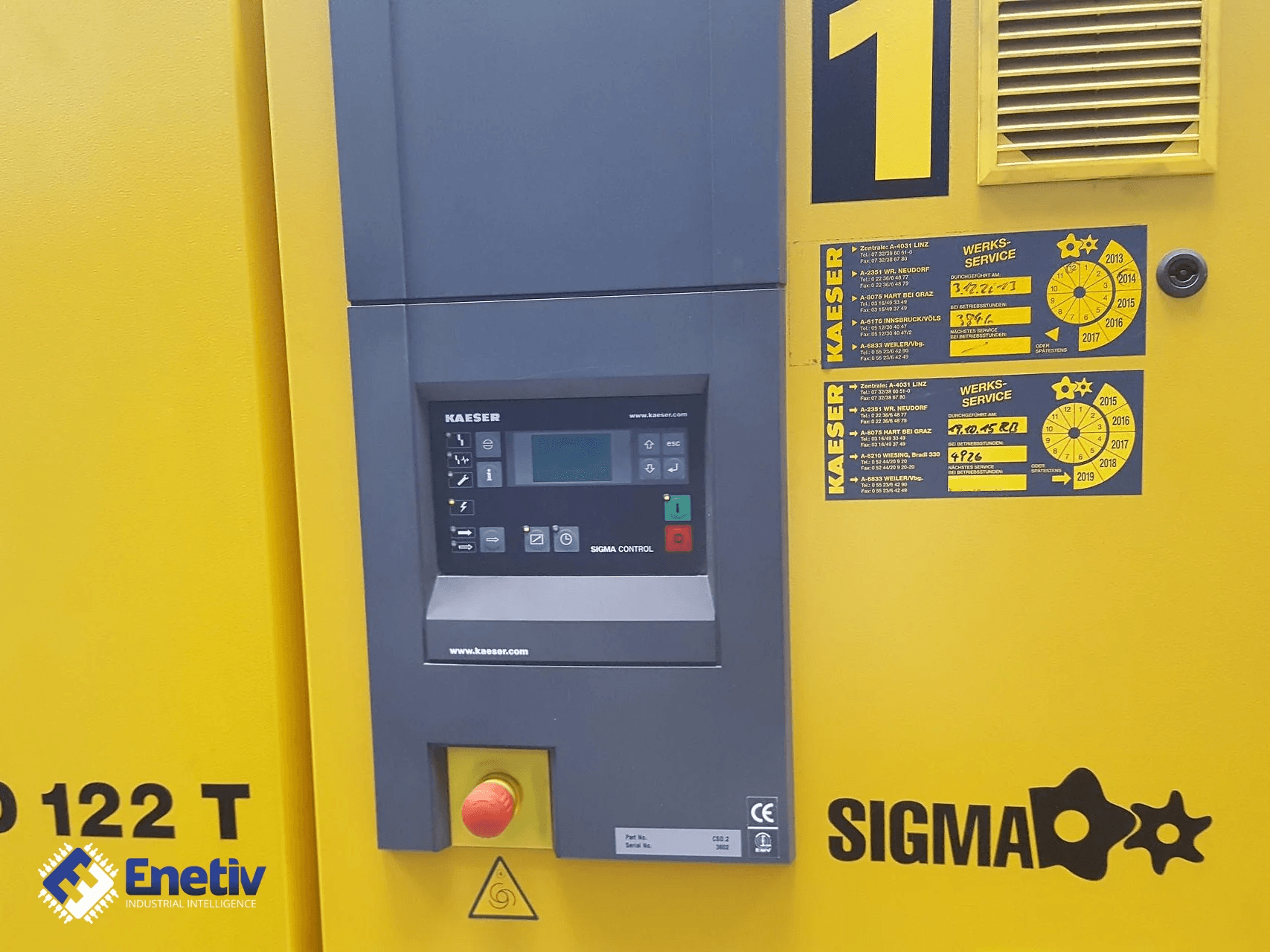
The name SIGMA CONTROL covers more than one controller generation, and for a used machine the first task is to establish which one you are dealing with. It is not known which generation is installed in the CSD 122 T; this is decided by the nameplate and the appearance of the controller itself, including the connectors on the back of the housing.
Identifying the generation has practical consequences, because it determines which documentation to look for, how to connect to the controller and what to expect from its screen and history. If inspection does not give a clear answer, it is best to compare the back of the controller with the photos in the manual, rather than relying on the name entered in the advertisement. The seller may describe the controller in shorthand, so the name alone is not enough to know which interfaces and which equipment are actually present.
Older generation of SIGMA CONTROL
The older generation is an industrial computer with an Intel processor. Before start-up, the supply voltage should be measured at the controller terminals, rather than assuming that the installation provides it. The interfaces of this generation are RS 232, RS 485 and Profibus DP, which makes it possible to assess immediately whether the machine was connected to a higher-level control system or worked standalone.
With such a controller it is worth paying attention to the condition of the wiring leading to the communication connectors, because it shows whether the machine was ever integrated with other devices. Disconnected or cut-off wires, remnants of labels on the conductors and traces of earlier adapters suggest what the former configuration looked like. Before disconnecting anything, take photos and label the wires, because reconstructing the connections from memory is often unreliable.
SIGMA CONTROL 2
SIGMA CONTROL 2 has a 10/100 Base T Ethernet socket in the RJ 45 standard, marked X1, and an SD/SDHC card slot marked X5. The communication module is an option, so its absence from the slot does not mean a fault, only a version without additional communication. The real-time clock has a 10-year battery backup; this matters, because the clock gives time stamps to the entries in the message history. The position of the X1–X5 interfaces is marked on the back of the controller, so these markings, together with the 10/100 Base T description, make it possible to quickly recognise this generation by the connectors alone.
The presence of the Ethernet socket and the SD card slot makes service work easier, because it makes it possible to connect to the controller and to keep data on an external medium. If there is a card in the slot, it should be treated as part of the machine's documentation: it may contain saved settings or operating data that must not be overwritten without making a copy first. It is also recommended to inspect the socket itself for damaged contacts, because the contacts affect reading of the card.
What to watch out for when testing and assessing the machine's condition
Before any switching on, make sure that the machine is disconnected from the main power supply in a way that allows safe inspection, and that the compressed air installation is not under pressure. The inside of the control cabinet may be opened only with the power disconnected and secured, and components that may retain a charge or voltage must be treated with caution. With a machine that has rotating parts and hot surfaces, it is also worth establishing beforehand who switches it on and when, so that nobody starts it during the inspection.
- External inspection: the housing, the control cabinet and the coolers show the conditions in which the machine operated, and dirty or damaged coolers reveal a neglected cleanliness of the surroundings.
- Connectors and contacts: traces of overheating, discolouration of insulation or corrosion on terminals and plugs indicate loose connections or moisture, and such faults later show up as random errors.
- LEDs and display after power-up: the controller should start without messages about a failure of itself, and the state of the LEDs and the content of the screen should be recorded or photographed before any intervention.
- Message history and service interval counters: they show whether services were carried out, and in SIGMA CONTROL 2, according to its manual, message 0049 means that the last service took place a year ago; its repeated appearance in the history indicates neglected maintenance, and its meaning must be confirmed in the documentation of the specific controller version, because it should not be attributed either to the older generation or to the 122 T model.
- Controller clock: in SIGMA CONTROL 2 the clock has a 10-year battery backup, so on an older machine it is worth comparing its reading with the actual date to assess whether the time stamps in the history are reliable.
- Hardware and software versions: they are read from the nameplates and labels, because without them it is not possible to select the right documentation or to compare the machine with another one.
- Analogue inputs: their values are checked with a calibrator or a current source, to distinguish a damaged sensor or measuring circuit from an incorrect reading by the controller itself.
- Dryer: if the machine is equipped with one, check its operation and the condensate drain, because a blocked drain quickly carries moisture into the air network.
- Documentation and settings backup: documenting the origin of the machine and making a backup of the settings before any changes makes it possible to return to the initial state and to distinguish your own changes from the history of the previous user.
Data to prepare before purchase or enquiry
Before purchase or an enquiry about parts and compatibility, a complete set of data about the machine should be prepared: the full type designation from the nameplate, the serial number, the hardware and software version of the controller, photos of the nameplate and of the connectors on the back of the controller, a description of the machine's application and the power supply data. The photos of the connectors decide which controller generation we are dealing with, and the remaining data make it possible to unambiguously match the documentation and any spare parts.
Questions and answers
What does the service interval message mean?
In SIGMA CONTROL 2, message 0049 informs that the last service took place a year ago, and the recommended action is to carry out the necessary maintenance work and reset the relevant interval counter. The way of resetting and the exact meaning of the message must be confirmed in the documentation of the specific controller version installed in the machine.
Enetiv works in industrial automation from two sides: we supply parts and we repair them. We have new, used and refurbished parts from brands including Allen-Bradley (Rockwell Automation), Siemens, Schneider Electric, Bosch Rexroth and ABB, we diagnose and repair inverters, servo drives, I/O modules and controllers, we service motors and servomotors, with our own warranty on repairs. We also specialize in end-of-life (EOL) parts and service, including older-generation and unusual components. Please contact us at https://enetiv.com/zapytanie.
Sources
- Kaeser Compressors, Inc. — SIGMA CONTROL 2 – manufacturer's brochure on the controller, edition 06/2018 (English version), 06/2018
- KAESER KOMPRESSOREN — SIGMA CONTROL 2 – operating manual (English version)
- KAESER KOMPRESSOREN — SIGMA CONTROL 2 – technician's handbook (Technician's handbook) (English version)
- KAESER KOMPRESSOREN GmbH — SIGMA CONTROL (older generation) – service manual (English version)
- Kaeser Compressors, Inc. — CSD series – manufacturer's brochure, edition 11/2005 (English version), 11/2005
Publication date: 23.11.2026