Micro800 Plug-In Modules (2080-SERIALISOL, 2080-OF2, 2080-IF2) and the Micro870 Controller – Does Every Module Fit Any CPU?
Files to download
How to verify compatibility of the 2080-SERIALISOL, 2080-OF2 and 2080-IF2 plug-in modules with the Micro870 controller at three levels: mechanical fit, CPU firmware, and Connected Components Workbench version – step by step, using Rockwell PCDC.
Micro800 Plug-In Modules (2080-SERIALISOL, 2080-OF2, 2080-IF2) and the Micro870 Controller – Does Every Module Fit Any CPU?
Automation engineers often wonder whether a chosen plug-in module – 2080-SERIALISOL, 2080-OF2, or 2080-IF2 – will work in their Micro870 controller without extra preparation. The answer requires analyzing not only physical fit, but also CPU firmware revision and the version of Connected Components Workbench (CCW) software. Below is a complete guide explaining every layer of compatibility, so you can avoid costly downtime.
Why use Micro800 plug-in modules in Micro870 controllers?
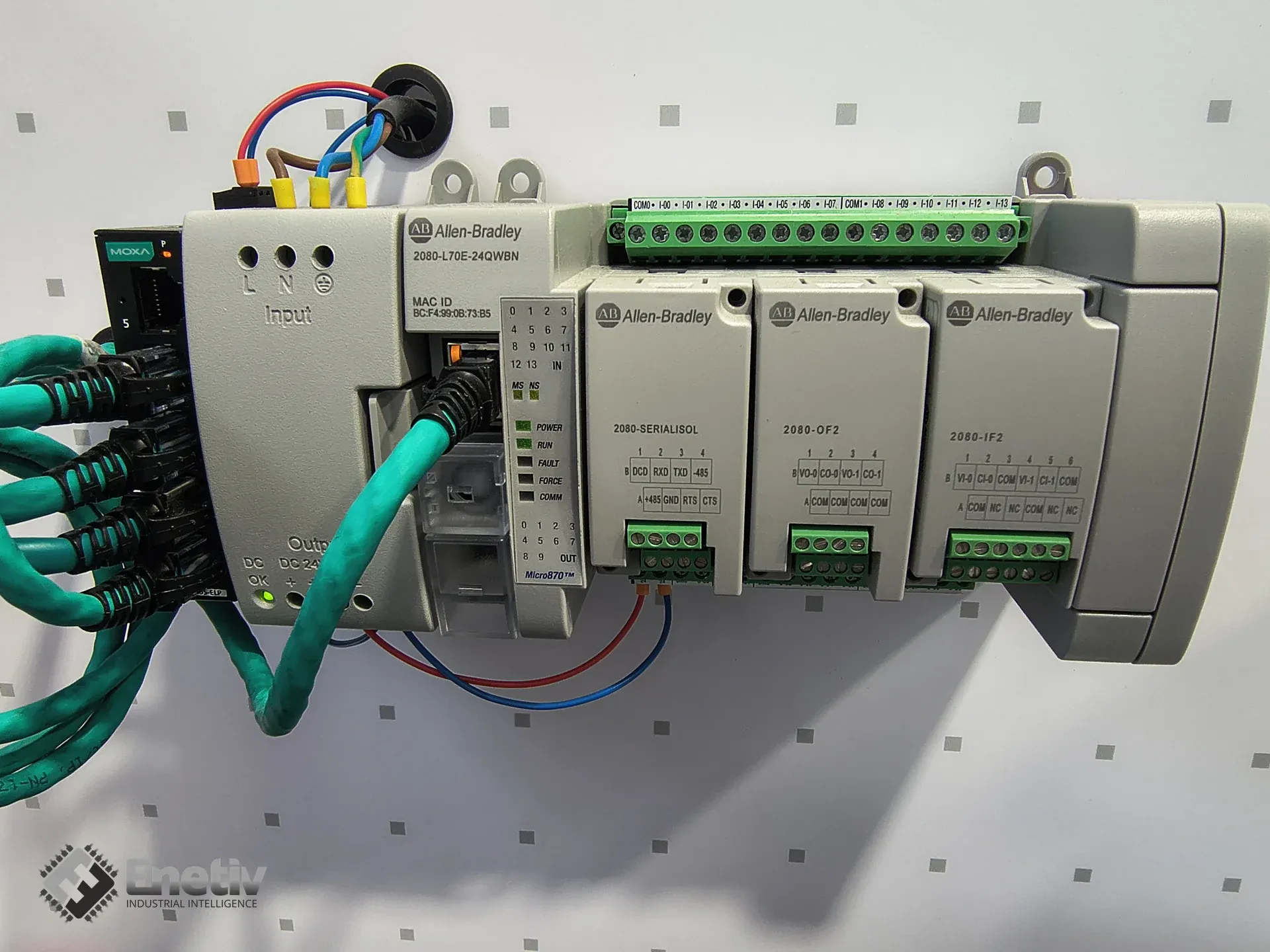
Micro800 plug-in modules let you extend a controller's functionality without expanding the entire control cabinet. Thanks to the compact design of the Micro870 (e.g., model 2080-L70E-24QWBN or 2080-L70E), you can add extra inputs/outputs, isolated serial ports, or analog outputs, saving space and reducing wiring costs. The 24-point Micro870 variant can accept up to 3 plug-in modules. According to the manufacturer's documentation, up to 4 Micro800 expansion modules are supported as standard, and when using more than 4 (up to a maximum of 8), an additional 2085-EP24VDC expansion power supply module is required.
Featured snippet: Micro800 plug-in modules such as 2080-SERIALISOL, 2080-OF2, and 2080-IF2 physically fit Micro870 slots, but correct operation depends on CPU firmware revision and CCW software version, both of which must meet certain minimums.
What functions do the 2080-SERIALISOL, 2080-OF2, and 2080-IF2 offer?
Each of these modules fills a different niche in the control system:
- 2080-SERIALISOL – an isolated RS-232/RS-485 serial port, useful for communicating with devices that require galvanic isolation. According to the manufacturer's verified wiring diagram, the module provides isolation at 500V AC (not 2kV, as is sometimes incorrectly stated).
- 2080-IF2 – a 2-channel analog input module (0-20 mA, 0-10 V, 12-bit, non-isolated), ideal for reading pressure or temperature sensors. A 4-channel version, 2080-IF4, is also available.
- 2080-OF2 – a 2-channel analog output module (0-20 mA, 0-10 V, 12-bit, non-isolated), used to control valves or transducers.
Featured snippet: The 2080-SERIALISOL provides an isolated RS-232/485 port (500V AC), the 2080-IF2 offers two analog input channels, and the 2080-OF2 offers two analog output channels – all fit Micro870 slots, but require the appropriate firmware version.
Does every module fit every Micro870 CPU – what does firmware determine?
The answer is no. A physical fit does not guarantee functional compatibility. Rockwell Automation requires the Micro870 controller (catalog number 2080-L70E) to have a specific minimum firmware revision before a module will be recognized and configured in CCW. Compatibility depends on the controller's firmware revision and the Connected Components Workbench version, as well as the hardware series (Series A / Series B) and catalog number. In the publicly available documentation (User Manual 2080-UM004, Technical Data 2080-TD001), we were unable to verify specific firmware version numbers for individual modules – these vary by hardware version and publication revision, so rather than quoting uncertain figures, we recommend always checking them in the manufacturer's tool (see step 2 below).
Rockwell also confirms that some modules have exclusions depending on the controller family – for example, the 2080-MEMBAK-RTC memory/real-time clock module is not supported on Micro870 controllers (nor on Micro820). The exact scope of exclusions for specific CPU catalog numbers should be verified directly in PCDC before purchase, as it may vary by hardware version.
The Connected Components Workbench (CCW) software version must support the firmware version installed on the CPU. Newer CCW versions automatically offer up-to-date .dmk files, but older versions may require manual download from Rockwell Automation Compatibility and Downloads. Keep in mind that mechanical compatibility alone does not guarantee functional and version compatibility.
Featured snippet: The 2080-SERIALISOL, 2080-IF2, and 2080-OF2 modules require a minimum Micro870 firmware version and a compatible CCW version to work correctly – the exact minimum version number should always be verified in Rockwell PCDC for the specific module and CPU catalog number, as these thresholds change with successive product revisions. Some Micro800 products also have exclusions depending on the controller family – e.g., the 2080-MEMBAK-RTC is not supported on Micro870 controllers.
How to verify compatibility step by step before buying?
Below is a practical guide to check whether the chosen module will work with your controller.
1. Read the current CPU firmware version
In CCW, open the project and select Device → Properties. On the General tab, you'll find the Firmware Revision field. Alternatively, on the controller's panel, select Menu → Diagnostics → Firmware to read the version number.
2. Check the module's minimum firmware requirements
Go to the Rockwell Automation Product Compatibility and Download Center (PCDC), enter the module's catalog number (e.g., 2080-IF2), and review the "Minimum Firmware" section. This is the only reliable source for current thresholds – these values are updated with new hardware revisions, so don't rely on numbers remembered from previous projects. PCDC lets you check firmware compatibility for a given product and search for firmware support for a specific device.
3. Download and update firmware if necessary
In CCW, go to Device → Update Firmware → Upgrade or Downgrade. Alternatively, in Project Organizer, right-click the controller and select Update. Choose the latest .dmk file available in Compatibility and Downloads and follow the wizard. Only select the Reset option if you want to clear the controller's memory during the update.
4. Verify the CCW version
Make sure your CCW version supports the firmware version you want to install or already have on the CPU – the exact requirement can be found in the release notes for that CCW version and in PCDC. Older CCW versions may not recognize newer modules or firmware versions and may display "Unsupported Module" errors.
Featured snippet: To verify compatibility, read the firmware version in CCW, check the minimum requirements in Rockwell Automation PCDC for the specific module and CPU, update the firmware if it's lower than required, and confirm that your CCW version supports the target firmware version.
What are the best practices for installation and configuration?
Micro800 plug-in modules are not hot-swappable – power down the controller before inserting them. After physical installation, each module must be added and configured in CCW so the system recognizes the new I/O channels. Keep the following steps in mind:
- Power off the PLC and wait at least 5 seconds.
- Insert the module into the chosen slot (A, B, or C) according to the mounting requirements.
- Power on and start CCW.
- In the CCW project, select Add New Module, enter the catalog number (e.g., 2080-OF2), and confirm.
- Check the channel mapping in the I/O Configuration tab and test operation in simulation mode.
For reliable commissioning, verify that the CCW version supports the given CPU firmware and that the required firmware files are installed or available for download. When planning a panel installation, keep in mind that the Micro870 has a limited number of plug-in slots; for the 24-point version, this is a maximum of 3 plug-in modules, and expansion I/O modules beyond 4 units require the additional 2085-EP24VDC power supply.
FAQ
Can I use the 2080-SERIALISOL in a Micro870-L70E-8QWBN controller?
Yes, the module physically fits one of the three available plug-in slots. However, correct operation requires CPU firmware meeting the minimum required for this module and a compatible CCW version – both thresholds should be checked in Rockwell PCDC for the specific CPU catalog number, as requirements may differ between hardware revisions.
Are the 2080-IF2 and 2080-OF2 interchangeable?
No. Although both have two channels, one is an analog input and the other an analog output. Swapping them requires changing the configuration in CCW and remapping the channels accordingly.
How do I check whether my controller has enough slots?
The technical documentation (e.g., Micro800 Programmable Controllers Technical Data 2080-TD001) contains a table listing the number of available slots – for L70E models, this is a maximum of 3 plug-in slots.
Can I update firmware without connecting the controller to a PC?
Yes, but this requires the dedicated Rockwell Automation Firmware Update Utility and an Ethernet connection. The procedure is described in the CCW update documentation.
What should I do if a module isn't detected after a firmware update?
Check whether your CCW version supports the new firmware version. If not, download the current .dmk files from Compatibility and Downloads and install them manually. Then power down the controller, reinsert the module, and start CCW.
Summary and support
Micro800 plug-in modules (2080-SERIALISOL, 2080-OF2, 2080-IF2) offer flexible functionality extension for Micro870 controllers (2080-L70E), but require careful compatibility verification at three levels: mechanical, CPU firmware, and CCW version. The verification procedure should include reading the current CPU firmware revision, checking the minimum firmware in Rockwell Automation PCDC for the specific catalog number, comparing it against the requirements for the specific module, and only then making a purchase. If the firmware version is too low, CCW allows firmware upgrade/downgrade, and firmware files can be downloaded from Compatibility and Downloads.
Enetiv sells products from leading brands, including Allen-Bradley (Rockwell Automation), Danfoss, ABB, and other industrial automation manufacturers. We offer new, used, and refurbished Micro800 modules, Micro870 controllers, and a full range of accessories and expansions. If you have questions about compatibility, configuration, or need support choosing the right modules for your project, please contact our team at enetiv.com/contact. Our specialists will help you choose the optimal solution and provide professional advice.
Sources
- Rockwell Automation – Micro800 RS232/485 Isolated Serial Port Plug-in Module, wiring diagram (500V AC isolation): https://literature.rockwellautomation.com/idc/groups/literature/documents/wd/2080-wd002_-en-p.pdf
- Rockwell Automation – Micro800 Plug-in Modules User Manual (2080-UM004): https://literature.rockwellautomation.com/idc/groups/literature/documents/um/2080-um004_-en-e.pdf
- Rockwell Automation – Micro800 Programmable Controller Family, Selection Guide (2080-SG001, plug-in slots, expansion modules, 2085-EP24VDC power supply): https://literature.rockwellautomation.com/idc/groups/literature/documents/sg/2080-sg001_-en-p.pdf
- Rockwell Automation – Micro800 Programmable Controllers Technical Data (2080-TD001, Micro870 slot count): https://literature.rockwellautomation.com/idc/groups/literature/documents/td/2080-td001_-en-p.pdf
- Rockwell Automation – 2080-OF2 product page: https://www.rockwellautomation.com/en-us/products/details.2080-OF2.html
- Rockwell Automation – Product Compatibility and Download Center (PCDC): https://compatibility.rockwellautomation.com